Overview¶
What This Document Covers¶
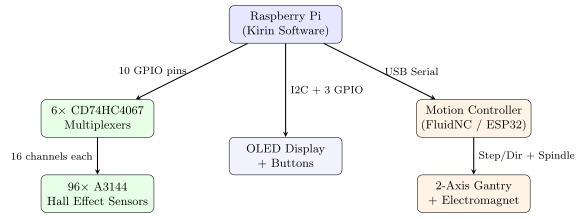
This guide walks through the complete process of connecting the Kirin software to the physical chess board hardware. By the end, you will have a Raspberry Pi running the Kirin engine, reading 96 hall effect sensors through multiplexers, driving an OLED status display, reading operator buttons, and controlling a gantry system via GRBL over serial.
The system has four hardware subsystems that connect to the Pi:
Hall Effect Sensors (96 total) — detect piece presence on the board and in the two storage zones. Read through 6 multiplexers using 10 GPIO pins.
Operator UI — a 128$\times$
<!-- -->{=html}64 I2C OLED for status messages plus Start, Stop, and Reset buttons on dedicated GPIO pins.Motion Controller — moves pieces via an electromagnet on a 2-axis gantry, over USB serial. Current hardware is FluidNC on an ESP32 with TMC2209 drivers; it speaks the same grbl
$/G-code protocol as the earlier Arduino/GRBL prototype, so everything in this part applies to both (D-40, §The motion controller).Electromagnet — controlled by the motion board via the coolant output (
M8/M9).LED Highlight Layer — 512 SK6805 LEDs in 8-per-square rings, driven over a second SPI bus through a level shifter (Ch. The LED Highlight Subsystem).
Touch Display — the DSI panel running the Qt/QML application, which is the primary operator interface; the OLED and buttons above are the headless fallback (Ch. Headless Operator UI: OLED and Buttons).
System Architecture¶
Runtime Move Pipeline¶
The physical game loop intentionally keeps a single software-to-hardware path for real hardware, dry-run, and simulation. For the common case where the human starts as white, one full cycle is:
Human moves a piece:
BoardScanner::waitForLegalMove()polls the board and storage muxes until the board or storage state differs from the synchronized baseline.Sensors stabilize: board and storage are debounced together. A candidate state must remain identical for
DEBOUNCE_SCANSreads separated byDEBOUNCE_DELAY_MS. The scanner never auto-commits after a timeout; unrecognized states only trigger an alert and the loop keeps waiting.Move is matched to engine format:
matchLegalMove()compares the stable occupancy delta against the engine’s legal move list. Captures are disambiguated with the exact storage slot that gained a piece andPieceTracker’s square-to-slot identity map.Engine state advances: the matched encoded move is passed to
makeMove(), thenGameController::updateTracker()keeps per-piece slot identity synchronized.Engine responds:
searchPosition()selectsbestMove.GameController::executeEngineMove()converts it to aPhysicalMove, builds aMovePlan, and sends that plan to the gantry controller.Blockers move out of the way: each
RelocationPlanis executed with magnet on/off dwell time around the move.Primary piece moves: the engine-selected piece follows the planned path from source to destination. Captures require an exact storage slot before any capture G-code is emitted.
Blockers restore: parked blockers are returned in reverse order. When a restoration path exists, the gantry follows it; only an empty restoration path falls back to a direct move.
Board is verified and re-baselined: after successful hardware execution, the engine state, physical occupancy model, scanner board baseline, and scanner storage baseline are synchronized before waiting for the next human move.
Note
The storage baseline used for a human turn is the last synchronized baseline, not a fresh scan taken after the prompt. This avoids a race where a fast player capture could accidentally become the new baseline instead of being detected as the move.
Warning
Do not bypass GameController::executeEngineMove() for real games. It is the boundary that enforces exact capture-slot routing, special-move sequencing, and physical-board state updates. The lower-level G-code helpers are useful for tests and diagnostics only.
Prerequisites¶
Item |
Details |
|---|---|
Raspberry Pi |
Pi 4 or Pi 5 (any RAM) |
OS |
Raspberry Pi OS (64-bit recommended) |
Compiler |
GCC with C++17 support |
CMake |
Version 3.10 or later |
libgpiod |
|
Serial port |
USB connection to GRBL controller |
Required components